Tips, Tricks & Troubleshooting

The best thing to always start with is reading your User Manual

Tips

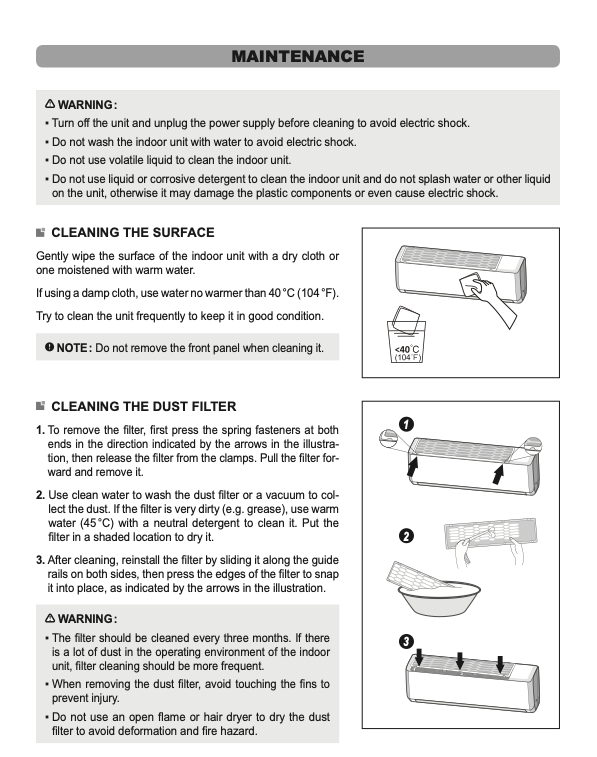
Cleaning Your Filters – Cleaning your filters on your indoor unit(s) is the best way to get the best indoor air quality and makes sure your unit is running as efficiently as possible.

To Clean your Filters, please follow these instructions.
Remotes

CLICK HERE – to learn more about your specific remote

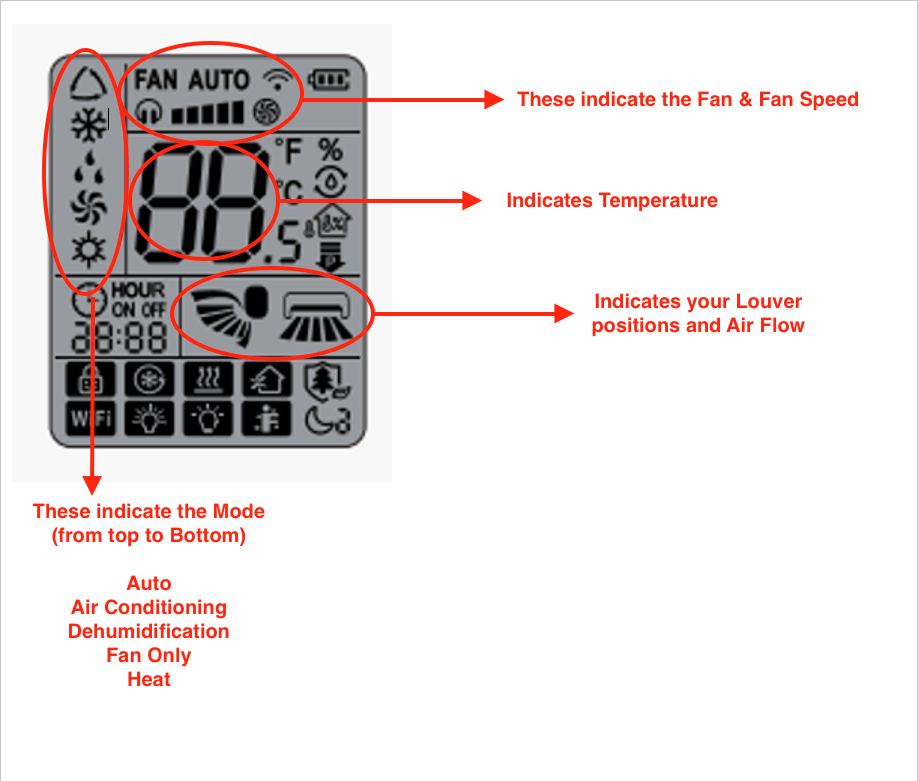
  • Review the Remotes below and choose that one that looks like yours. All button descriptions are provided.
  • Familiarize yourself with the Operation, Modes, and Icons that will be displayed on the remotes screen.

The most important icons are the MODE icons, FAN Speed, Temperature, and Louver Positions for Air Flow.
Tricks

Performing a Hard Reset

A hard reset on your Gree heat pump(s) often clears minor errors and communication faults.

These instructions are for all Single Head & Multi Head Units

Hard Reset Instructions — Gree Heat Pump

  1. Turn off the indoor unit (s) using the remote.
  2. Remove the batteries from (each) Remote
  3. Locate your outdoor unit breaker(s) in the Electrical Panel
  4. Turn the Breaker (s) OFF
  5. Wait 15 minutes — this allows the system to fully discharge and reset.
  6. Turn the breaker(s) back ON.
  7. Reinstall the batteries in each remote that you removed batteries
  8. Use the remote to turn the indoor unit back ON and set it to your desired mode (ie. Heat/Cool).
  9. Make sure ALL heads are in the SAME MODE, ie. Heat/ Cool (if a multi head system)
  10. Allow the unit to run for 10–15 minutes to stabilize.

If You Still See an Error Code or the Unit does not Perform as intended

Please send us an email (info@valleyriverheatpumps.com) with the following information:

– The exact error code showing on the indoor unit (if any)
– A brief description of what the system is doing. Ie. Power wont come on, No warm air etc
– Any recent changes (power outage, storm, etc.)

Wifi – Gree+ App

Click Here

Troubleshooting

Most Common Error Codes & How to Fix Them

E7

What the E7 Error Means

  • Mode Conflict (Most Common): In a multi-zone (multi-head) system, all indoor units must operate in the same mode (either all heating or all cooling). If one unit asks for heat and another asks for cool, the outdoor unit cannot satisfy both, causing an E7 error.

How to Fix the E7 Error

  1. Unify the Modes (Multi-Head System): Ensure all indoor unit remotes are set to the same mode (e.g., all on Heat or all on Cool).
  2. Turn Off “Auto” Mode: If units are set to “Auto” mode, they may automatically switch between heating and cooling, causing a conflict. Change them to a specific mode.
  3. Perform a System Reset: Turn off the power to the heat pump at the circuit breaker or via the disconnect switch for 5 to 10 minutes. This allows the circuit boards to fully reset.
  4. Check Remote Control Batteries: Old batteries can send faulty signals to the unit, causing it to act strangely.

E1

What the E1 Error Means

  • The E1 Error on Gree single and multi-head heat pumps (mini-splits) indicates High-Pressure Protection in the refrigeration system. This means the compressor is generating too much pressure, which trips a safety switch to prevent damage to the unit.

Common Causes of E1 Error

  • Dirty Air Filters: Clogged indoor filters restrict airflow, causing the system to overwork.
  • Dirty Outdoor Coils: Debris (leaves, dirt, ice) covering the outdoor unit prevents heat transfer.
  • Multi-Zone Specific: If only one head is running on a multi-head unit, the unit may be overcharged for the low load, causing high pressure.

Troubleshooting Steps (DIY)

  1. Perform a Hard Reset (See Above) : Click here for instructions
  2. Clean Indoor Filters: Clean the filters on all indoor head units
  3. Inspect Outdoor Unit: Clear any debris, snow, or ice from the outdoor condenser unit.
  4. Check Operating Mode: Ensure all indoor units are set to the same mode (either all heat or all cool). Make sure they are all in the ON position.

Additional FAQ About Gree Heat Pumps

General Issues (All Gree Systems)

My heat pump won’t turn on. What should I check?

Possible causes:

  • Power breaker is tripped
  • Remote batteries are dead
  • Unit is in timer mode
  • Wi-Fi/app conflict

What to try:

✔️ Check your electrical panel
✔️ Replace remote batteries
✔️ Turn unit off and back on
📞 Call service if it still won’t start.

The unit is running but not heating or cooling well.

Possible causes:

  • Dirty air filters
  • Blocked airflow
  • Extreme outdoor temperatures
  • Incorrect mode setting

What to try:

✔️ Clean filters
✔️ Remove furniture/obstructions
✔️ Confirm correct mode (Heat/Cool/Auto)
✔️ Set temperature 2–3°C above/below room temp

Why is water dripping from my indoor unit?

Normal causes:

  • Condensation
  • High humidity
  • Defrost cycle

Problem causes:

  • Clogged drain line

What to try:

✔️ Check for blocked drain
✔️ Ensure unit is level
📞 Call if leaking continues.

My unit is making unusual noises.

Common sounds:

  • Clicking = normal expansion
  • Humming = compressor running
  • Whooshing = refrigerant flow

Concerning sounds:

⚠️ Grinding
⚠️ Screeching
⚠️ Loud rattling
📞 Call service if noises are persistent or loud.

🏠 Single Head (Mini-Split) Systems

Only one room isn’t heating/cooling properly.

Possible causes:

  • Dirty filter
  • Blocked airflow
  • Sensor issue

Fix:

✔️ Clean filter
✔️ Clear airflow
✔️ Reset unit

The remote isn’t working.

Possible Causes:

  • Dead batteries
  • Signal blocked
  • Wrong mode

Fix:

✔️ Replace batteries
✔️ Point directly at unit
✔️ Reset remote

The unit turns on and off frequently

Possible causes:

  • Room is reaching set temperature quickly
  • Thermostat sensor issue

📞 If constant cycling continues, book service.

Heating in one room affects another.

This is normal in multi systems.

Because all heads share one outdoor unit:

  • One head on high heat can reduce output elsewhere
  • Different modes (Heat vs Cool) may conflict

✔️ Best practice: Run all heads in the same mode.

Error code appears on one unit only.

Likely a:

  • Communication fault
  • Sensor issue
  • Expansion valve issue

📞 Service required.

🏠 Ducted Central Gree Systems

Weak airflow from vents.

Possible causes:

  • Clogged filter
  • Frozen coil
  • Duct restriction
  • Blower issue

Fix:

✔️ Replace filter
✔️ Turn unit off (thaw if frozen)
📞 Call if airflow doesn’t return.

System freezes up in winter.

Possible causes:

  • Restricted airflow
  • Low refrigerant
  • Defrost malfunction

⚠️ Do NOT run frozen unit.

📞 Turn off and call service.

⚠️ Common Error Codes (All Systems)

Code Meaning What It Means
U0 Low refrigerant Possible leak
U4 Communication error Indoor/outdoor issue
P1 High/low voltage Electrical issue
P4 Compressor fault Mechanical problem
E1/E6 Sensor/communication Needs diagnosis

📞 Error codes usually require professional service.

🔧 Maintenance Issues (Very Common)

How often should I clean filters?

✔️ Every 4–6 weeks
✔️ More often with pets/dust

Dirty filters cause:

  • Poor heating/cooling
  • Higher power bills
  • System strain

Why is my power bill higher?

Common reasons:

  • Dirty filters
  • Extreme weather
  • Poor insulation
  • System running constantly

✔️ Annual maintenance helps reduce costs.

When Is It an Emergency?

Call immediately if:

✅ No heat in winter
✅ Electrical burning smell
✅ Water leaking heavily
✅ Repeated breaker trips
✅ System completely dead

📞 902-334-3000

📌 When to Call Valley River

Contact us if:

✔️ Error codes appear
✔️ Performance drops suddenly
✔️ Unit won’t start
✔️ Strange noises continue
✔️ Freezing or leaking occurs

Most issues are simple when caught early.
Book Estimate/Service